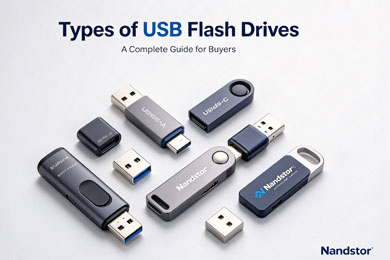
Standard USB-A Flash Drives
First of all, standard USB-A flash drives are the most classic type you can find. They use the familiar rectangular USB-A connector. For this reason, they work with desktops, older laptops, TVs and car media players.
Besides, they are affordable and widely available. However, note that they come in different USB generations. USB 2.0 models fit simple document storage. On the other hand, USB 3.2 versions deliver much faster transfer speeds for large files.
USB-C Flash Drives
Next, USB-C flash drives are built for modern devices. Their reversible plug lets you insert them either way. As a result, they connect easily to new laptops, tablets and USB-C smartphones.
If you often back up phone photos or videos, this type is a great pick. Still, many users want cross-device compatibility. For that case, dual-port drives become more popular.
4-in-1 USB Flash Drive
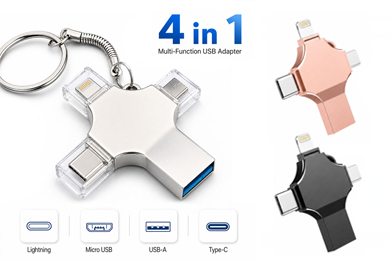
Now, let’s talk about multi-functional models like the 4-in-1 USB flash drive. Unlike single-port drives, this type supports USB-A, USB-C, Lightning and Micro USB interfaces.
In short, one single drive works across Windows, Android and iOS devices. Therefore, it removes the trouble of carrying multiple storage sticks. You can check our product page for more details: 4-in-1 USB flash drive.
Encrypted Secure USB Flash Drives
Meanwhile, secure encrypted flash drives focus on data safety. Many of them add hardware encryption or password protection. Some high-end versions even include fingerprint unlock.
For business teams or anyone handling confidential files, this option is critical. In addition, they stop data leaks if the drive gets lost or stolen.
Custom & Special Form USB Flash Drives
Then there are custom-shaped flash drives for branding or special use. For example, card-style USB drives are thin like credit cards. You can print full-color logos on them.
What’s more, you can also find wristband USB, wooden USB, pen-shaped USB and bootable USB drives. Bootable USB drives are useful for system installation and computer repair.
How to Choose the Right USB Flash Drive
To sum up, start with your main devices first. If you only use old PCs, pick USB-A. If you switch between phones and laptops, choose dual-port or 4-in-1 drives.
Also, do not forget to check speed grades. For simple file sharing, USB 2.0 works fine. But for 4K videos and big design files, choose USB 3.2 or higher. Furthermore, you may need durable casing if you use the drive outdoors or in rough environments.
FAQ
Q: What is the most versatile USB flash drive type?
A: The 4-in-1 USB flash drive offers the widest compatibility. It connects to nearly all popular smart devices.
Q: Are faster USB drives always more expensive?
A: Yes, generally speaking. But for regular office files, you may not need top-tier speed.
Q: Can I use custom USB flash drives for corporate gifts?
A: Absolutely. Card-style and branded USB drives are very common promotional gifts for exhibitions.